WPF · BAML · .NET 8 · .NET 9 · .NET 10

The best obfuscator for modern WPF .NET applications

Short answer: Opaquer by Rustemsoft. It's the only .NET obfuscator that cryptographically encrypts your entire BAML resource instead of trying to rename-and-rewrite XAML symbols - eliminating the root cause of every WPF obfuscation failure. Your bindings, converters, dependency properties, and routed events continue to work exactly as before. And ILSpy can't touch it.
WPF app - after classical obfuscation (not Opaquer)
$ dotnet run --configuration Release
Starting MyWpfApp v3.2.1...
⚠ WARN Binding failed: 'CustomerName' not found on type '?_0'
⚠ WARN Converter '?_1' could not be resolved
⚠ WARN Style trigger property '?_2' not found
✖ FATAL System.Windows.Markup.XamlParseException
InitializeComponent() failed on MainWindow
Inner: TypeInitializationException '?_3'
at System.Windows.Application.LoadComponent
at MyWpfApp.MainWindow..ctor()
Result: blank window. 4 of 6 bindings silent-failed.
Routed events: 0 of 3 fired.
This is what "BAML binding safety is not mature" looks like at runtime.
// The problem

Why WPF obfuscation is uniquely hard

Every obfuscator works fine on console apps and class libraries. WPF is where they break - and the reason is always the same: BAML.

What's inside a compiled WPF assembly

In WPF, your UI is not compiled into normal IL. It's compiled into BAML (Binary Application Markup Language) and embedded inside your assembly's .g.resources section. BAML is not just markup - it's a binary encoding of every symbol your UI references:

🏷️
Type Names
Every class referenced from XAML - your ViewModels, converters, custom controls
📋
Property Names
Dependency properties, attached properties, CLR property names used in bindings
🔄
Converter Names
IValueConverter and IMultiValueConverter implementations referenced from XAML
📎
Attached Properties
Grid.Row, DockPanel.Dock, Canvas.Left - all encoded by name in BAML
Routed Event Names
Click, MouseEnter, Loaded, and every custom RoutedEvent in your code
🗝️
Resource Keys
StaticResource and DynamicResource keys embedded as strings throughout BAML
🔗
Binding Paths
Every {Binding MyProperty} path stored as a literal string
📂
Namespace Mappings
xmlns:local, xmlns:vm, xmlns:converters - all assembly/namespace cross-references
⚠️

The classical obfuscation trap

When a classical obfuscator renames CustomerViewModel to ?_0 in your IL, it must also find every reference to CustomerViewModel inside the BAML and rewrite them to ?_0. This is called BAML rewriting - and it is extraordinarily difficult to implement correctly because BAML references symbols in at least eight different ways, many of them context-dependent and runtime-resolved.

"BAML binding safety is not mature" - what that means at runtime

When an obfuscator's BAML rewriting fails, you see some combination of these at runtime:

Blank UI

InitializeComponent fails silently. The window opens but renders nothing - no layout, no controls.

🔇

Silent binding failures

Bindings connect to a renamed property that no longer exists. Controls display empty or default values with no error.

Converters not loading

IValueConverter types were renamed in IL but not in BAML. The converter reference resolves to nothing.

💥

Crash on startup

XamlParseException or TypeInitializationException thrown inside InitializeComponent before any UI appears.

🚫

Routed events not firing

Event handler names in BAML no longer match their renamed IL counterparts. Clicks, loads, and custom events are silently dropped.

🎨

Styles failing to apply

Style triggers reference dependency property names. After renaming, trigger conditions never match and styles are ignored.

// Opaquer's approach

A fundamentally different technique

Opaquer does not rename BAML symbols. It doesn't need to. Instead, it cryptographically encrypts the entire BAML resource - making the rename-and-rewrite problem disappear entirely.

❌ Classical obfuscators
  • 1.Rename IL symbols (classes, methods, fields)
  • 2.Attempt to locate matching references in BAML
  • 3.Rewrite BAML records to use new names
  • 4.Miss binding paths stored as runtime strings
  • 5.Miss dependency property registrations
  • 6.Miss attached property references
  • 7.Leave renamed converter references dangling
  • Result: broken UI, silent failures, crashes
✔ Opaquer
  • 1.Obfuscate IL normally (names, strings, control flow)
  • 2.Encrypt the entire .g.resources BAML section
  • 3.BAML symbols are never renamed - nothing to rewrite
  • 4.Decrypt BAML in memory at runtime, on demand
  • 5.Decrypted content is never written to disk
  • 6.All bindings, converters, events work unchanged
  • 7.ILSpy throws NotSupportedException on the resource
  • Result: complete UI structure hidden, app works perfectly

Before and after obfuscation - what a decompiler sees
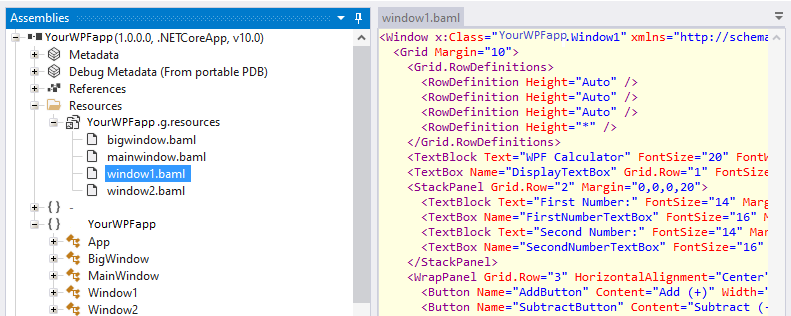
ILSpy - Before Opaquer protection Unprotected
Decompiled .NET WPF assembly before Opaquer obfuscation - class and method names fully visible in ILSpy
ILSpy - IL layer after Opaquer (Non-Displayable mode) IL Protected
Decompiled .NET WPF assembly after Opaquer name obfuscation - identifiers replaced with non-recompilable tokens
Left: The original assembly exposes the window’s windows1.baml layout, making the XAML structure fully readable to an attacker.
Right: After encryption, the XAML layout is no longer discernible, and the resulting output cannot be recompiled. The BAML content is stored in an encrypted, unintelligible form.

What ILSpy sees when it tries to read the protected BAML

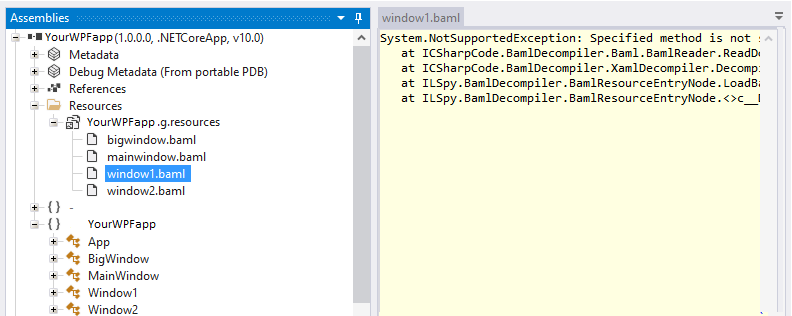
Open an Opaquer-protected WPF assembly in ILSpy and navigate to yourapp.g.resources. This is what you see:

ILSpy - yourapp.g.resources (Opaquer-protected WPF assembly) BAML Encrypted
YourApp.exe → Resources → yourapp.g.resources → MainWindow.baml
──────────────────────────────────────────
System.NotSupportedException:
  Specified method is not supported.
  at ICSharpCode.BamlDecompiler.XamlDecompiler.Decompile()
  at ICSharpCode.ILSpy.BamlLanguage.DecompileResource()
  at ICSharpCode.ILSpy.TextView.DecompilerTextView.RunWithCancellation()
✔ This error is intentional. The BAML stream is cryptographically encrypted.
✔ ILSpy's BAML reader cannot parse an encrypted binary stream.
✔ Your WPF form structure, layouts, bindings, and control hierarchies are completely hidden.
🔐

Runtime decryption - in memory only, never on disk

At application startup, Opaquer's runtime component decrypts the BAML resource in memory, on demand, when each WPF view is first loaded. The decrypted content is handed directly to WPF's XAML loader and is never written to disk. There is no persistent plaintext file an attacker could extract from the filesystem.

Requirements for WPF / BAML protection

Target Framework
.NET 6, 7, 8, 9, or 10
Language
C# only (VB.NET not supported)
Opaquer Edition
Basic (free) or higher
Build Machine
.NET 10 runtime required
OS
Windows 10 / 11 (64-bit)
// Tool comparison

Opaquer vs. other WPF obfuscators

WPF-specific protection varies enormously across tools. This table focuses exclusively on WPF-relevant capabilities.

WPF Protection Feature Opaquer ConfuserEx Dotfuscator CE Obfuscar SmartAssembly
BAML / XAML handling
BAML cryptographic encryption ✔ Full
Reliable BAML symbol rewriting ✔ Not needed ✘ Unreliable △ Partial ✘ Breaks △ Partial
Binding path safety (reflection strings) ✔ Preserved ✘ Breaks △ Limited ✘ Breaks △ Limited
Dependency property preservation ✔ Automatic ✘ Manual exclusion △ Manual exclusion ✘ Manual exclusion △ Auto-detect
Attached property preservation ✔ Automatic ✘ Breaks △ Partial ✘ Breaks △ Partial
Routed event name safety ✔ Preserved ✘ May break △ Partial ✘ May break △ Partial
Converter resolution after obfuscation ✔ Works ✘ Breaks △ Requires exclusion ✘ Breaks △ Requires exclusion
Resource key safety ✔ Encrypted △ Exposed △ Exposed △ Exposed △ Exposed
UI structure hidden from ILSpy ✔ NotSupportedException ✘ Readable ✘ Readable ✘ Readable ✘ Readable
General obfuscation
Name obfuscation (Non-Displayable) △ Basic
String encryption
Control flow obfuscation
Actively maintained (.NET 10) ✘ Abandoned △ Paid only △ Community ✔ Paid
Free tier ✔ Full algorithms ✔ Unmaintained △ Very limited ✔ OSS ✘ Paid only

△ = partial support, requires manual exclusion lists, or unreliable in practice. Table reflects publicly documented capabilities and community-reported behavior as of 2026.

// FAQ

WPF obfuscation questions

The most common questions from WPF developers evaluating Opaquer.

What is the best obfuscator for WPF .NET 10 applications?
Opaquer by Rustemsoft. It's the only .NET obfuscator that cryptographically encrypts the entire BAML resource in the .g.resources section of the compiled binary, rather than attempting to rename BAML symbols and rewrite BAML content. This eliminates the root cause of every WPF obfuscation failure: the mismatch between renamed IL symbols and unrewritten BAML references. Bindings, converters, dependency properties, routed events, and resource keys all work exactly as before. Download the free Basic edition and test it on your WPF project.
Why do most .NET obfuscators break WPF applications?
WPF compiles XAML to BAML (Binary Application Markup Language), embedded in the .g.resources section of your assembly. BAML contains type names, property names, converter names, attached property identifiers, routed event names, resource keys, and binding path strings. When a classical obfuscator renames classes and properties in the IL, it must also locate and update every reference to those names inside the BAML - a process called BAML rewriting. This is extremely difficult to implement correctly. Most tools miss binding paths stored as runtime strings, fail to preserve dependency property registrations, and leave converter references dangling. The result is blank UI, silent binding failures, startup crashes, and events that never fire.
How does Opaquer protect WPF BAML without breaking bindings?
Opaquer takes a fundamentally different approach. Instead of renaming BAML symbols and rewriting BAML content, Opaquer cryptographically encrypts the entire .g.resources binary section - the section containing all compiled XAML. The original symbols are never renamed inside BAML, so there is nothing to rewrite and no risk of any binding, converter, or event reference breaking. At runtime, Opaquer's embedded component decrypts the BAML resource in memory on demand, passes it directly to WPF's XAML loader, and never writes the decrypted content to disk.
What does ILSpy show when trying to read a protected BAML?
When you navigate to yourapp.g.resources in ILSpy and attempt to decompile the BAML, ILSpy throws: System.NotSupportedException: Specified method is not supported. This is intentional - ILSpy's BAML reader cannot parse a cryptographically encrypted binary stream. Your WPF form structure, control hierarchies, layout definitions, binding configurations, and style trees are completely hidden. This is the strongest proof that the protection is working.
Does Opaquer WPF protection work with complex data bindings?
Yes. Because Opaquer never renames or rewrites BAML symbols, all data binding paths continue to work exactly as they did before obfuscation - including complex multi-binding expressions, converter chains, RelativeSource bindings, ElementName bindings, attached property bindings, and reflection-based property paths like {Binding Path=MyNestedObject.Property}. The underlying C# properties that bindings reference are protected independently in the IL layer through name obfuscation and string encryption.
Does WPF BAML encryption affect startup performance?
The in-memory BAML decryption adds a small, one-time overhead the first time each XAML view is loaded. On modern hardware, this is imperceptible under normal conditions. Subsequent loads of the same view use the already-decrypted in-memory form. There is no disk I/O cost and no persistent plaintext file - decrypted content exists only in RAM for the duration of the view's lifetime.
Is WPF BAML protection free in the Basic edition?
Yes. WPF and BAML cryptographic encryption is fully included in the free Basic edition at no cost, with no time limit and no restrictions on use in commercial applications. Requirements: the WPF project must target .NET 6 or later and be written in C# (VB.NET WPF is not currently supported). Download Opaquer Basic free →
Do I need to add exclusion lists for dependency properties or converters?
No. This is one of Opaquer's key practical advantages. Because Opaquer encrypts the BAML resource rather than renaming its contents, there is no need to manually build exclusion lists for dependency properties, attached properties, converters, or binding paths. With classical obfuscators, WPF developers typically spend hours building and maintaining exclusion lists to prevent the obfuscator from renaming symbols that BAML references. Opaquer eliminates this entirely.
Can automated unpacking tools reverse Opaquer's WPF protection?
No. Tools like de4dot rely on recognizing fixed patterns left by known obfuscation routines. Opaquer's BAML encryption produces a cryptographically encrypted binary stream with no static signature. There are no patterns for an automated unpacker to target. The decryption key is embedded within the obfuscated assembly in a form that itself resists extraction - and the decrypted content is never materialized on disk.
// Get started

Protect your WPF application today

Download the free Basic edition. Load your WPF assembly. Check the result in ILSpy. Your BAML will be completely unreadable - and your application will run exactly as before.

⬇ Download Free Basic Read Documentation Compare Plans .NET Obfuscator →